

It is possible to transmit signals to Databoom using platforms to supervise and industrial control making use of HMI/Scada software technology, like WinCC.
Data forwarding is implemented through the writing of a VBScript.
Requirements
To run the script correctly, you need curl. It is possible to check its installation by running the command in a command line. If it is not present in your system, get the installer at the download page of th cURL site.
VBScript
The script consists of two parts:
- Loop, deals with the cyclic execution of the script
- Handlers, handles errors, if any, while running
Depending on the WinCC version it is possible to create only two scripts VBscript (Loop and Handlers) or to create a script per function (in particular Handlers consists of 6 functions).
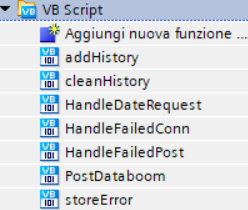
VBScript functions in WinCC V14 SP1
 Sub PostDataboom()
	Dim prev, apiClock, apiPost, apiKey, curl, curlGet, jsonEmpty

	'File di log per tutte le variabili
	Dim logs<SIGNAL_1>
	Dim logs<SIGNAL_2>

	Dim logError 'memorizza tutti gli errori
	Dim logBulk 'memorizza il post prima dell'inoltro in caso di bulk
	Dim resultPost
	Dim resultDate
	Dim resultBulk

	prev = -1
	apiClock = "https://api.databoom.com/v1/auth/gmtclock/plain"
	apiPost = "https://api.databoom.com/v1/signals/push"
	apiKey = "<USER_API_KEY>"
	curl = "cmd /C <CURL_FULL_PATH> --header ""apikey: " & apiKey & """" & " --header ""Content-Type: application/json"" -X POST -d """
	curlGet = "cmd /C <CURL_FULL_PATH> -X GET "
	jsonEmpty = "{\""MSG\"":\""OK\""}"

	'Definisco i percorsi dei file di log
 	logs<SIGNAL_1> = "<LOGS_DIR_FULL_PATH>\<SIGNAL_1>.txt"
	logs<SIGNAL_2> = "<LOGS_DIR_FULL_PATH>\<SIGNAL_2> .txt"

	logError = "<LOGS_DIR_FULL_PATH>\ERRORS.txt"
	logBulk = "<LOGS_DIR_FULL_PATH>\bulkToPost.txt"
	resultPost = "<LOGS_DIR_FULL_PATH>\resultPost.txt"
	resultDate = "<LOGS_DIR_FULL_PATH>\resultDate.txt"
	resultBulk = "<LOGS_DIR_FULL_PATH>\resultBulk.txt"

	Do While True
		If (Minute(Now) <> prev) And (Minute(Now) Mod 5 = 0) Then
		    Dim sDate, postResult, bulkResult, JSONString, canConn, FSO, TS
			Const ForReading = 1, ForWriting = 2, ForAppending = 8
			Set FSO = CreateObject("Scripting.FileSystemObject")
			'Verifica la presenza dei file di log, li genera se non li trova
			On Error Resume Next
				Set TS = FSO.OpenTextFile(logs<SIGNAL_1>, ForAppending, True)
				TS.Close
				Set TS = FSO.OpenTextFile(logs<SIGNAL_2>, ForAppending, True)
				TS.Close
			If Err.Number <> 0 Then
				storeError logError, Err, "Can't create log file"
			    Err.Clear
			End If

			canConn = True
			sDate = ""
			postResult = ""
			bulkResult = ""

			Dim objWshShell, result
			Set objWshShell = CreateObject("Wscript.Shell")

			On Error Resume Next
				'objWshShell.run curl & jsonEmpty & """ " & apiClock & "  > " & resultDate, 0, True
				objWshShell.Run curlGet & apiClock & "  > " & resultDate, 0, True
			If Err.Number <> 0 Then
				storeError logError, Err, "Can't curl date"
				Err.Clear
			End If

			Set result = FSO.OpenTextFile(resultDate, ForReading)
			sDate = result.ReadAll
			result.Close

			If Len(sDate) <> 21 Then
				HandleDateRequest canConn,sDate
				Set TS = FSO.OpenTextFile(logError, ForAppending)
				TS.Write ((Year(Now)*100 + Month(Now))*100 + Day(Now))*10000 + Hour(Now)*100 + Minute(Now) & " - ERROR: Can't retrieve date: " & sDate & vbCrLf
				TS.Close
			End If


			'Definisco le variabili per la lettura dei dati
			Dim <SIGNAL_1>
			Dim <SIGNAL_2>

			'Assegno alle variabili quelle di WinCC
			Set <SIGNAL_1>= SmartTags("<SIGNAL_1_WINCC_VAR>") 'A seconda della versione utilizzare SmartTags() o HMIRuntime.Tags()
			Set <SIGNAL_2>= SmartTags("<SIGNAL_2_WINCC_VAR>")

			JSONString = "{\""device\"":\""<DATABOOM_DEVICE_TOKEN>\"",\""date\"":\""" & sDate & "\"", \""signals\"":["
			JSONString = JSONString & "{\""name\"":\""<DATABOOM_SIGNAL_1_TOKEN>\"",\""value\"":"& Replace(<SIGNAL_1>,",",".") & "}," 'nel caso di utilizzo di HMIRuntime.Tags(), utilizzare .Read(1) per la lettura dei valori delle variabili
			JSONString = JSONString & "{\""name\"":\""<DATABOOM_SIGNAL_2_TOKEN>\"",\""value\"":"& Replace(<SIGNAL_2>,",",".") & "}"
			JSONString = JSONString & "]}"

			On Error Resume Next
				objWshShell.Run curl & JSONString & """ " & apiPost & "  > " & resultPost, 0, True
			If Err.Number <> 0 Then
				storeError logError, Err, "Can't curl post, " & JSONString
				Err.Clear
			End If

			Set result = FSO.OpenTextFile(resultPost, ForReading)
			postResult = result.ReadAll
			result.Close

			If postResult <> "{""message"":""ALL_INFO_PROCESSED""}" Then
				HandleFailedPost canConn, FSO, TS, sDate, Replace(<SIGNAL_1>,",","."), logs<SIGNAL_1>
				HandleFailedPost canConn, FSO, TS, sDate, Replace(<SIGNAL_2>,",","."), logs<SIGNAL_2>

				Set TS = FSO.OpenTextFile(logError, ForAppending)
				TS.Write ((Year(Now)*100 + Month(Now))*100 + Day(Now))*10000 + Hour(Now)*100 + Minute(Now) & " - ERROR: Can't send post " & postResult & vbCrLf
				TS.Close
			End If

			If canConn = True Then
				Dim bulk, emptyBulk
				emptyBulk = True
				bulk = "{""device"":""<DATABOOM_DEVICE_TOKEN>"",""date"":" & sDate & ", ""signals"":{"

				'Per ogni segnale aggiungo i dati raccolti nei rispettivi bulk
  				bulk = bulk & " ""<DATABOOM_SIGNAL_1_TOKEN>"" : {""description"":""<DATABOOM_SIGNAL_1_TOKEN>"", ""history"":["
  				addHistory logs<SIGNAL_1>, bulk
				If StrComp(Right(bulk, 1),",") = 0 Then
					bulk = Left(bulk, Len(bulk) - 1) & "]},"
					emptyBulk = False
				Else
					bulk = bulk & "]},"
				End If

				bulk = bulk & " ""<DATABOOM_SIGNAL_2_TOKEN>"" : {""description"":""DATABOOM_SIGNAL_2_TOKEN>"", ""history"":["
  				addHistory logs<SIGNAL_2>, bulk
				If StrComp(Right(bulk, 1),",") = 0 Then
					bulk = Left(bulk, Len(bulk) - 1) & "]}}}"
					emptyBulk = False
				Else
					bulk = bulk & "]}}}"
				End If

  				If emptyBulk = False Then
  					On Error Resume Next
	  					Set TS = FSO.OpenTextFile(logBulk, ForWriting)
						TS.Write bulk
						TS.Close
  					If Err.Number <> 0 Then
						storeError logError, Err, "Can't log bulk"
					    Err.Clear
					End If

  					On Error Resume Next
  						objWshShell.Run curl & "@" & logBulk & """ " & apiPost & "  > " & resultBulk, 0, True
  					If Err.Number <> 0 Then
						storeError logError, Err, "Can't run bulk curl"
					    Err.Clear
					End If

					Set result = FSO.OpenTextFile(resultBulk, ForReading)
					bulkResult = result.ReadAll
					result.Close

					If bulkResult <> "{""message"":""ALL_INFO_PROCESSED""}" Then
						HandleFailedConn canConn
						Set TS = FSO.OpenTextFile(logError, ForAppending)
						TS.Write ((Year(Now)*100 + Month(Now))*100 + Day(Now))*10000 + Hour(Now)*100 + Minute(Now) & " - ERROR: Can't send bulk " & bulkResult & vbCrLf & bulk & vbCrLf
						TS.Close
					End If

   					If canConn = True Then
    					cleanHistory logsPotenza
						cleanHistory logs<SIGNAL_1>
						cleanHistory logs<SIGNAL_2>
   					End If
  				End If
 			End If

			FSO.DeleteFile(logBulk)
			FSO.DeleteFile(resultPost)
			FSO.DeleteFile(resultDate)
			FSO.DeleteFile(resultBulk)

			Set TS = Nothing
			Set FSO = Nothing
			prev = Minute(Now)
		End If
	Loop
End Sub
The example has two tags, you can add more by following the same procedure.
WARNING! When adding new variables, always check closing parenthesis. Last variable must not have commas at the end, as the <Signal 2> in the example, while other variables must mirror <Signal 1>.
Sub addHistory(ByVal logFile, ByRef bulk)
  Const ForReading = 1
  Dim FSO, TS
  Set FSO = CreateObject("Scripting.FileSystemObject")
  Set TS = FSO.OpenTextFile(logFile, ForReading)
  Do Until TS.AtEndOfStream
   bulk = bulk & TS.ReadLine & ","
  Loop
  TS.Close
End Sub
Sub cleanHistory(ByVal logFile)
  Const ForWriting = 2
  Dim FSO, TS
  Set FSO = CreateObject("Scripting.FileSystemObject")
  Set TS = FSO.OpenTextFile(logFile, ForWriting, True)
  TS.Write ""
  TS.Close
End Sub
Sub HandleDateRequest(ByRef canConn, ByRef sDate)
	canConn = False
	sDate = Year(Date) & "-" & Right(String(2, "0") & Month(Date), 2) & "-" & Right(String(2, "0") & Day(Date), 2) & "T" & Right(String(2, "0") & Hour(Now), 2) & ":" & Right(String(2, "0") & Minute(Now), 2) & ":" & Right(String(2, "0") & Second (Now), 2)
End Sub
Sub HandleFailedConn(ByRef canConn)
	canConn = False
End Sub
Sub HandleFailedPost(ByRef canConn, ByRef FSO, ByRef TS, ByVal sDate, ByVal variable, ByVal logsVariable)
	Const ForAppending = 8
	canConn = False

	Set TS = FSO.OpenTextFile(logsVariable, ForAppending, True)
	TS.Write "{""date"":"""& sDate &""",""value"":"& variable &"}" & vbCrLf
	TS.Close
End Sub
Sub storeError(ByVal logError, ByRef errData, ByRef errExtra)
  Const ForAppending = 8
  Dim FSO, TS
  Set FSO = CreateObject("Scripting.FileSystemObject")
  Set TS = FSO.OpenTextFile(logError, ForAppending, True)
  TS.Write ((Year(Now)*100 + Month(Now))*100 + Day(Now))*10000 + Hour(Now)*100 + Minute(Now) & " - Error: [" & Err.Number &  ", "& Err.Source &", "& Err.Description & "] "& errExtra & vbCrLf
  TS.Close
End Sub
Script execution
Once the scripts are ready in WinCC, you can start recording data in Databoom.
One possible approach is to call the main function when opening the main window of your project.
Open the Graphics Designer functionality from the side menu and access the main windows, <NAME>.PDL. Click the right mouse button on the base level and choose the Properties menu. Go on the Event tab and set a VBS action.

The action to write is:
Sub OnOpen()
  PostDataboom
End Sub
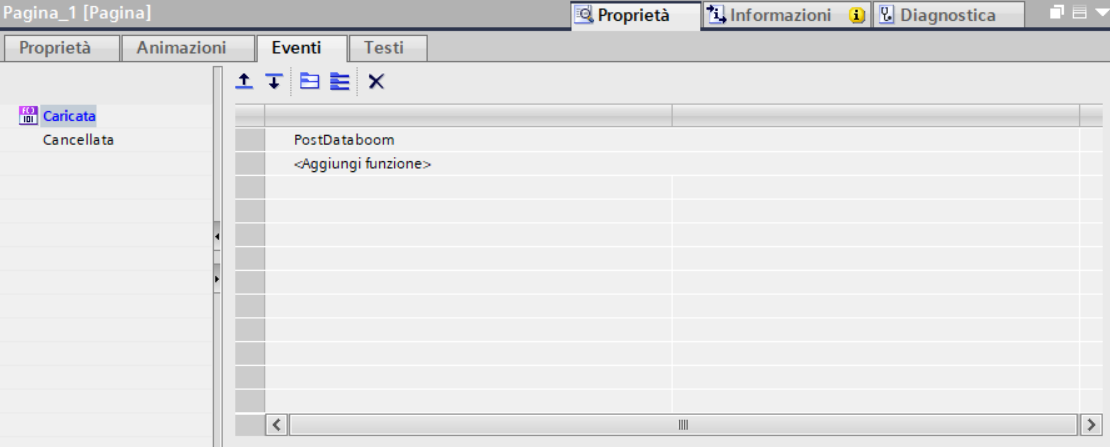
Script execution in WinCC V14 SP1
Configuration completed!
Once the procedure has been completed, Databoom starts to record data sent from WinCC. To examine your data and have a correct representation, follow the instructions in Edit/validation of a signal.
0 Comments